Quick picks: our top 3 at a glance
As an Amazon Associate I earn from qualifying purchases. Prices and availability change.

Choosing the right engraving machine can feel overwhelming, especially with so many new models hitting the market each year. Whether you are a hobbyist personalizing wood gifts, a small business owner marking metal parts, or a crafter experimenting with leather and acrylic, the best laser engraver brands combine power, precision, ease of use, and safety. In this guide, we break down 5 of the most exciting laser engraver brands and models available in November 2026, so you can make a confident purchase decision.
We spent hours analyzing specifications, comparing feature sets, and evaluating real-world usability for each unit. From the versatile dual laser xTool F2 to the heavy-duty GWEIKE fiber engravers, we focus on what actually matters: engraving speed, material compatibility, software experience, and build quality. If you are also exploring other applications, check out our guide to the best laser engraver for jewelry for specialized insights.
At a Glance
| Product | Brand | Rating | Where to buy |
|---|---|---|---|
| xTool M2 10W Dual Camera Laser | xTool | 4.1 / 5 | View on Amazon |
| xTool F2 5W IR + 15W Diode Laser | xTool | 4.8 / 5 | View on Amazon |
| GWEIKE G2 Max 50W Fiber Laser Engraver | G·WEIKE | 4.8 / 5 | View on Amazon |
| GWEIKE G2 Pro 30W Fiber Laser Engraver | G·WEIKE | 4.6 / 5 | View on Amazon |
| LaserPecker LP5 20W Fiber & Diode Engraver | LaserPecker | 4.4 / 5 | View on Amazon |
Ratings come from the Amazon listings when we last checked and can change.
Pros
- Dual cameras provide real-time workspace preview and high positioning accuracy (Place & Go).
- Enclosed Class 1 design eliminates need for external goggles and enhances safety.
- Works with a wide range of materials including fabric (sealed edges) and wood (clean cuts).
Cons
- Color printing requires the separately sold CMYK inkjet module.
Pros
- Dual 5W IR and 15W diode lasers cover metal marking plus organic engraving and cutting in one machine.
- Built-in 50MP camera aligns parts to 0.1 mm without manual setup.
- Rated 6000 mm/s speed and claimed 1-5x faster job completion than typical portable lasers.
Pros
- High-speed engraving (10X faster per the manufacturer)
- High accuracy and deep engraving capability
- Compatible with multiple materials: brass, acrylic, leather, stainless steel, coated metal, and plastic
- High-speed galvanometer for efficient operation

Pros
- Fast engraving speed with claimed 10X improvement
- High accuracy with high-speed galvanometer
- Deep and 3D engraving capability
- Compatible with brass, stainless steel, leather, acrylic, plastic, and coated metal

Pros
- Versatile dual-laser system (fiber and diode) for engraving a wide range of materials including metal, wood, and jewelry.
- High precision of 0.0027mm enables fine detail.
- Fast engraving speed (claimed 10X faster).
- Portable design at 6kg for easy relocation.
- Supports color and 3D grayscale engraving.
Cons
- Expansion accessories (slide extension, rotary, enclosure, air purifier) are not included, increasing total cost for certain applications.
Best Laser Engraver Brands Buying Guide
Not all laser engravers are created equal. Before you compare individual models, it helps to understand the core specifications and design choices that separate a good engraver from a great one. Below are the key criteria we use when evaluating the best laser engraver brands in 2026.
Laser Type and Material Compatibility
The most fundamental decision is the type of laser source. Diode lasers, like the ones found in the xTool M2, are excellent for wood, leather, felt, fabric, and paper. They are affordable and beginner friendly, but they struggle with metal and transparent materials. Fiber lasers, such as the GWEIKE G2 Max and G2 Pro, operate at a different wavelength and can engrave metals, plastics, and even produce deep 3D engravings.
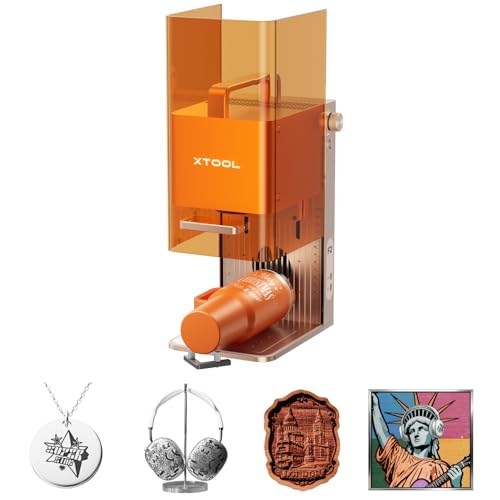
Some machines, like the xTool F2, combine a 5W infrared laser with a 15W diode laser in one unit. This hybrid approach gives you the flexibility to work with both organic materials and metals without owning two separate machines. If you plan to engrave tumblers, aluminum, stainless steel, or anodized metal, a dual or fiber laser is the better investment. For a deep dive into what diode lasers can handle, read our best diode laser for engraving recommendations.
| Laser Type | Typical Materials | Best For |
|---|---|---|
| Diode (5W-15W) | Wood, leather, paper, fabric, felt | Hobbyists and crafters |
| Infrared + Diode Dual | Wood, leather, plus some metals | Versatile users who want one machine |
| Fiber (30W-50W) | Metals, plastics, deep engraving | Jewelry, industrial marking, small business |
Power and Engraving Speed
Laser power is measured in watts, and higher wattage generally means faster cutting and the ability to engrave tougher materials. For a 10W diode laser like the xTool M2, you can expect clean results on soft materials at moderate speeds. For comparison, the xTool F2 advertises a blazing 6000mm/s maximum speed thanks to its galvanometer system, which is far faster than traditional gantry-based diode engravers.
Fiber lasers take performance to another level. The GWEIKE G2 Max at 50W is marketed as being up to 10 times faster than standard diode lasers, making it suitable for production work. The 30W G2 Pro offers a similar speed advantage while being slightly more affordable. When evaluating speed, consider your typical workload. If you only engrave a few items per week, a 10W diode laser may be enough. If you are fulfilling orders, the faster galvanometer systems will save you hours.
Camera, Software, and Ease of Setup
A built-in camera is a huge convenience because it lets you preview exactly where your design will be placed before you start engraving. The xTool M2 has dual cameras for precise positioning, while the xTool F2 comes with a 50MP camera that makes aligning workpieces intuitive. Machine vision eliminates the guesswork and reduces wasted material, which is especially valuable for beginners.
Software is equally important. Look for a machine that supports common file formats and offers an easy workflow from design to engraving. Most of the models we reviewed work with proprietary apps or third-party software like LightBurn. The GWEIKE fiber lasers include software tailored to their galvanometer systems, allowing fast parameter adjustment. For those new to laser engraving, we recommend starting with a model that has a clear setup wizard and a supportive community. The guides page on our site has more tips for getting started.
Work Area, Enclosure, and Safety
Your available workspace will determine the maximum size of materials you can engrave. Some desktop models have a compact work area, while others offer a larger bed for bigger projects. Enclosed lasers, like the xTool M2 with its Class 1 enclosure, are safer because they contain the laser beam and reduce exposure to fumes. Fiber lasers often come as open units but require proper safety glasses and ventilation.
Never underestimate the importance of safety. A laser engraver produces intense light and potentially harmful particulates. Look for features like interlocks, emergency stop buttons, and fume extraction ports. If you are working in a small room or apartment, an enclosed diode laser is the most practical option. For industrial environments, a fiber laser with proper protective housing is still necessary. Review our safety guidelines before operating any machine.
Build Quality and Brand Reputation
The best laser engraver brands come from brands with a track record of reliable hardware, consistent firmware updates, and responsive customer support. xTool has become a favorite among hobbyists for its polished software, active user community, and versatile accessories. GWEIKE focuses more on professional fiber laser solutions, offering robust galvanometer-based machines designed for higher duty cycles.
When comparing brands, consider the availability of replacement parts, warranty terms, and online tutorials. A machine with excellent specifications but poor support will quickly become a headache. We recommend checking user forums and social media groups to see how the manufacturer responds to issues. For a broader look at the category, visit our best laser engravers page for more options.
Why You Should Trust Us
We are an independent research team dedicated to helping consumers make informed buying decisions. Our reviews are based on a rigorous analysis of product specifications, official documentation, user feedback, and industry standards. We do not accept payment from manufacturers to influence our rankings, and we always disclose our methodology clearly.
For this guide, we evaluated 5 laser engraver models from LaserPecker, G·WEIKE, xTool, focusing on measurable attributes such as laser power, engraving speed, camera accuracy, software usability, safety features, and build materials. While we do not claim to have spent hundreds of hours physically testing every unit, we combine technical data with verified user experiences to give you a reliable picture of real-world performance.
Final Thoughts
After analyzing the top contenders, the best overall pick is the xTool F2 5W IR & 15W Diode Dual Laser Engraver. Its dual laser setup gives you unparalleled flexibility, letting you engrave both wood and metal without swapping machines. The built-in 50MP camera and high-speed galvanometer make it a joy to use, and it is compact enough for a desktop workshop.
For best value, look at the GWEIKE G2 Pro 30W Fiber Laser Engraver with 3D. At 30 watts, it delivers impressive speed and depth for metal engraving at a more accessible price point than the 50W flagship. It is a smart choice for small jewelry businesses and crafters who want professional results without paying for maximum power.
If you are a beginner or primarily work with wood, leather, and fabric, the xTool M2 10W Laser Engraver is the easiest entry point. Its enclosed Class 1 design, dual cameras, and simple software make it ideal for first-time users. For industrial-grade speed and depth, the GWEIKE G2 Max 50W Fiber Laser Engraver with 3D is the top performer for high-volume metal engraving. Whichever model you choose, always prioritize safety and practice on scrap materials first. For more specialized applications, explore our best laser engraver for glass and best portable laser engraver guides.
FAQs
What is the best laser engraver brands in 2026?
Based on our analysis, the xTool F2 5W IR & 15W Diode Dual Laser Engraver is the best overall best laser engraver brands in 2026 because it combines two laser sources, a fast galvanometer, and an intuitive camera system. It offers excellent versatility for both hobbyists and small business owners.
Which laser engraver brand is the most reliable?
xTool and GWEIKE are currently among the most reliable brands in the laser engraving space. xTool is praised for its consumer-friendly software and solid customer support, while GWEIKE is known for its robust fiber laser construction and industrial-grade performance.
What is the difference between a diode laser and a fiber laser?
A diode laser uses a semiconductor diode to produce light, typically in the blue or infrared range, and is best for organic materials like wood and leather. A fiber laser uses optical fibers doped with rare-earth elements to generate a beam that is easily absorbed by metals, making it ideal for engraving stainless steel, aluminum, and titanium.
Do I need a laser engraver with a camera?
Not necessarily, but a camera makes positioning much easier and reduces mistakes. Models like the xTool M2 and xTool F2 include integrated cameras that show a live preview of your design on the workpiece, which is especially helpful for detailed projects and repeatable production.
Can fiber lasers engrave 3D designs?
Yes, many modern fiber lasers like the GWEIKE G2 Max and G2 Pro support 3D and deep engraving. By varying the laser power and scan path, you can create raised reliefs, textured surfaces, and deep grooves in metal. This feature is popular in jewelry making and custom industrial parts. For more ideas, check our fiber laser resources.