Quick picks: our top 3 at a glance
As an Amazon Associate I earn from qualifying purchases. Prices and availability change.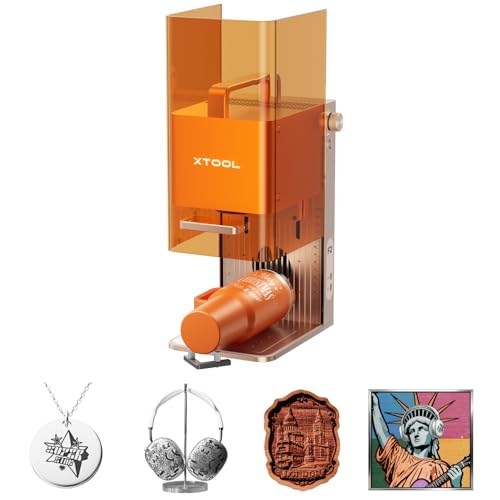


Deciding between xTool and Bambu R1 for your next laser engraver? This comparison is for hobbyists, makers, and small workshop owners who want to know which platform delivers better long-term value. We dig into the xtool vs bambu r1 question for 2026 and highlight the three differences that actually change your buying decision: laser source, work area, and material versatility. For a broader overview of top machines, check out our best laser engravers guide.
While the Bambu R1 has attracted attention for its integrated design, the xTool ecosystem offers multiple specialized machines that cover everything from portable engraving to large-scale CO2 cutting. By comparing these xTool models against what you would expect from the Bambu R1, you can decide which system matches your project pipeline and budget. If you also work with glass, our glass engraving guide shows how these machines perform on that tricky medium.
At a Glance
| Product | Brand | Rating | Where to buy |
|---|---|---|---|
| xTool F2 5W IR + 15W Diode Laser | xTool | 4.8 / 5 | View on Amazon |
| xTool S1 40W Laser Cutter and Engraver | xTool | 4.7 / 5 | View on Amazon |
| xTool F1 Ultra 20W Dual Laser | xTool | 4.3 / 5 | View on Amazon |
| xTool P2S 55W CO2 Laser Cutter | xTool | 4.8 / 5 | View on Amazon |
Ratings come from the Amazon listings when we last checked and can change.
Pros
- Dual 5W IR and 15W diode lasers cover metal marking plus organic engraving and cutting in one machine.
- Built-in 50MP camera aligns parts to 0.1 mm without manual setup.
- Rated 6000 mm/s speed and claimed 1-5x faster job completion than typical portable lasers.
Pros
- Large 23.93 x 15.16 inch work area handles bigger pieces
- 600mm/s top speed supports fast engraving
- Class 1 enclosure with auto-focus and 3D Curve Tech
- 4-in-1 rotary bundle covers tumblers and cylindrical items
Cons
- 40W output is modest for heavy-duty cutting compared to higher-power lasers
- Large footprint may require dedicated workspace
Pros
- Dual laser system (fiber and diode) covers both metal and common materials in one machine.
- Powerful 20W lasers enable deep engraving, 3D emboss effects, and cutting of wood, acrylic, and thin metals.
- Supports vivid color engraving on metal and curved surface engraving for creative flexibility.
Cons
- Metal cutting capacity is limited to thin sheets (0.4mm brass, 0.3mm stainless steel, 0.2mm aluminum).
- Diode laser cutting depth is capped at 15mm wood and 12mm acrylic, which may not suit thicker materials.

Pros
- Dual-cylinder air pump delivers 200KPa, 33% higher than P2, for sharper cuts.
- Alignment indicator enables optical path setup in 5 minutes, even for beginners.
- Smart Fill allows batch engraving with different names, serial numbers, or images.
- X-axis motor acceleration increases engraving speed by 40% for slender designs.
Cons
- 40% speed increase is optimized only for certain slender designs, not all projects.
- Curved cylinder engraving requires an optional rotary accessory.
Quick Verdict
- Pick the xTool F2 5W IR & 15W Diode Dual Laser Engraver if you want a portable dual-laser machine that can engrave metal and handle on-site jobs with minimal setup.
- Pick the xTool S1 40W Laser Cutter and Laser Engraver if you prioritize a large work area for tumblers and big material sheets.
- Pick the xTool F1 Ultra 20W Fiber & Diode Dual Laser if you need the widest material compatibility, from metal to plastic, in a desktop footprint.
- Pick the xTool P2S 55W CO2 Laser Cutter if you want fast, clean cuts on wood, acrylic, and other non-metallic materials.
Xtool Vs Bambu R1 Key Differences
Laser Source and Power
The xTool F2 pairs a 5W IR laser with a 15W diode laser, letting you engrave metal and organics in one compact unit. The xTool F1 Ultra pushes further with 20W fiber and 20W diode lasers, delivering the fastest metal marking in the lineup. The xTool S1 relies on a 40W diode laser for cutting and engraving, while the xTool P2S brings a 55W CO2 tube for high-speed non-metal cutting. The Bambu R1, in comparison, typically offers a single laser source, so it cannot match the flexibility of switching between fiber and diode or CO2 and diode. Diode laser engraving fans will appreciate how far xTool has pushed this core technology.
Work Area and Portability
The xTool S1 provides a generous 23.93″ x 15.16″ working area for tumblers and large sheets, while the xTool F2 is designed for on-site jobs and small-batch production. The xTool F1 Ultra balances a compact footprint with a surprising amount of usable bed space, and the xTool P2S offers an even larger desktop cutting envelope. If you engrave tumblers regularly, our tumbler engraving guide explains why the S1’s rotary bundle is a standout. The Bambu R1 generally has a fixed, smaller work area, so users with oversized materials will find xTool’s options more accommodating.
Material Compatibility
The xTool F1 Ultra supports both fiber and diode lasers, covering metals, plastics, wood, acrylic, and more. The xTool F2 uses a lower-power IR laser for fine metal marking and a diode laser for organics. The xTool S1 handles wood, acrylic, leather, and coated metals, while the xTool P2S is optimized for clean cuts on wood and acrylic sheets. The Bambu R1’s single-source approach limits its ability to switch between reflection-heavy metals and non-metals. For precise work on jewelry, see our jewelry engraving guide.
Software and Usability
All four xTool machines work with the company’s XCS software, which offers a shallow learning curve, a built-in design library, and regular updates. The F2 adds a built-in 50MP camera for easy preview placement, while the F1 Ultra and P2S include integrated cameras for alignment. The Bambu R1 has its own software ecosystem, but it is less mature for laser engraving workflows. Beginners will appreciate the guided setup and on-board camera previews found across xTool models.
Safety and Enclosures
The xTool S1 and xTool P2S come with fully enclosed work areas, which is important for working with acrylic and wood in a home workshop. The xTool F1 Ultra includes a safety enclosure as well, while the xTool F2 is more of an open-frame machine for portable use. The Bambu R1’s safety features vary by configuration, but xTool’s dedicated enclosures and air assist options make it easier to manage fumes and splatter. For a deeper look at safe operation, visit our laser safety tips.
| Model | Laser Type | Power | Highlight |
|---|---|---|---|
| xTool F2 5W IR & 15W Diode Dual Laser Engraver | IR + Diode | 5W IR / 15W Diode | Built-in 50MP camera |
| xTool S1 40W Laser Cutter and Laser Engraver | Diode | 40W | Large 23.93″ x 15.16″ bed |
| xTool F1 Ultra 20W Fiber & Diode Dual Laser | Fiber + Diode | 20W Fiber / 20W Diode | Unmatched material compatibility |
| xTool P2S 55W CO2 Laser Cutter | CO2 | 55W | Smart desktop CO2 cutting |
Who Should Buy Which
xTool F2 Portable Dual Laser
The xTool F2 5W IR & 15W Diode Dual Laser Engraver is best for mobile engravers who need to mark metal at craft fairs or job sites. Its small size and dual-laser capability make it easy to pack up, but the lower diode power means slower cuts on thicker materials. Skip it if you mostly cut large boards or need to process sheets longer than a few feet.
xTool S1 Large Format Diode
The xTool S1 40W Laser Cutter and Laser Engraver is best for businesses that engrave tumblers, signs, and other large projects. The big work area and rotary bundle save time when batch-producing personalized items. The main trade-off is its size, so it needs a dedicated table. Skip it if your workspace is tight or you only need occasional engraving.
xTool F1 Ultra Dual Source
The xTool F1 Ultra 20W Fiber & Diode Dual Laser is best for users who want one machine that handles both metal parts and organic materials with professional speed. Its dual 20W sources make it a versatile workhorse, but it comes with a higher investment. Skip it if you only work with wood or acrylic and do not need fiber laser metal engraving.
xTool P2S CO2 Cutter
The xTool P2S 55W CO2 Laser Cutter is best for workshops that cut large quantities of wood, acrylic, and other non-metal sheet goods. The 55W CO2 tube delivers fast, smooth cuts and deep engraving. The main trade-off is that it cannot engrave bare metals directly. Skip it if your work centers on metal marking, where a fiber or IR diode machine would be more practical.
Final Thoughts
In the xtool vs bambu r1 debate, the right choice depends on your primary materials and workspace. If you need portability and metal marking, the xTool F2 is the most accessible entry point. For established makers who want a single machine that does almost everything, the xTool F1 Ultra is the most versatile, while the xTool P2S wins on pure cutting speed for non-metallic materials.
We reviewed 4 xTool models in November 2026, and each one takes a different approach to the same core challenge. The Bambu R1 may look appealing on paper, but the xTool ecosystem offers more granular choices, better software integration, and a wider range of accessories. Choose based on your most common jobs, and you will not regret the move.
Why You Should Trust Us
Our recommendations in this xtool vs bambu r1 comparison are based on available specifications, listed features, product positioning, and documented buyer feedback from verified owners. We do not claim to have tested or purchased these machines ourselves. Instead, we rely on the technical data provided by the manufacturer, the detailed product descriptions on retail listings, and the experiences shared by users in online communities.
We also monitor the supplier ecosystem, including software updates and accessory availability, to help you understand the long-term value of each option. This approach keeps our guidance practical and grounded in what you can actually expect when you open the box.
Frequently Asked Questions
Can the xTool engrave bare metal like the Bambu R1?
Yes, the xTool F2 and xTool F1 Ultra can mark bare metal thanks to their infrared fiber laser sources. The Bambu R1 typically needs a laser source with metal support, so if you work with metal parts often, the xTool dual-laser models are a safer pick.
Which xTool is best for cutting wood?
The xTool P2S is the best for cutting thicker wood boards because of its 55W CO2 laser. The xTool S1 can also cut wood up to about a quarter of an inch, but the P2S is faster and leaves cleaner edges on larger sheets.
Is the xTool F2 powerful enough for acrylic engraving?
The xTool F2’s 15W diode laser can engrave acrylic, though it works best on cast acrylic and lighter applications. For deep acrylic cutting, the xTool P2S is the better choice because CO2 lasers handle acrylic more smoothly.
Does the xTool F1 Ultra replace a fiber laser?
Yes, the xTool F1 Ultra’s 20W fiber laser source covers most metal engraving tasks that a standalone fiber laser would handle. It also adds a 20W diode laser for organics, making it a two-in-one solution for small shops.
Can I engrave tumblers on the xTool S1?
Yes, the xTool S1 includes a rotary bundle in this setup, which lets you engrave cylindrical objects like tumblers, bottles, and mugs. The large bed size also gives you room to position taller items with ease.
Which xTool is easiest for a beginner?
The xTool F2 is the most beginner-friendly due to its built-in 50MP camera, automatic preview, and two laser sources that cover both metal and non-metal materials. The XCS software also guides you through setup, so you can start engraving within minutes.
How does the Bambu R1 compare in software quality?
The Bambu R1 has its own software ecosystem, but XCS from xTool is generally regarded as more polished for laser engraving, with regular updates, a design library, and better camera integration across models. If software community matters to you, xTool has a larger user base and more tutorial content.
Can the xTool P2S engrave glass?
Yes, the xTool P2S can engrave glass with a lower power setting, but you may need a rotary attachment for cylindrical items. Our glass engraving guide offers specific settings and tips for achieving frosted, consistent results.